
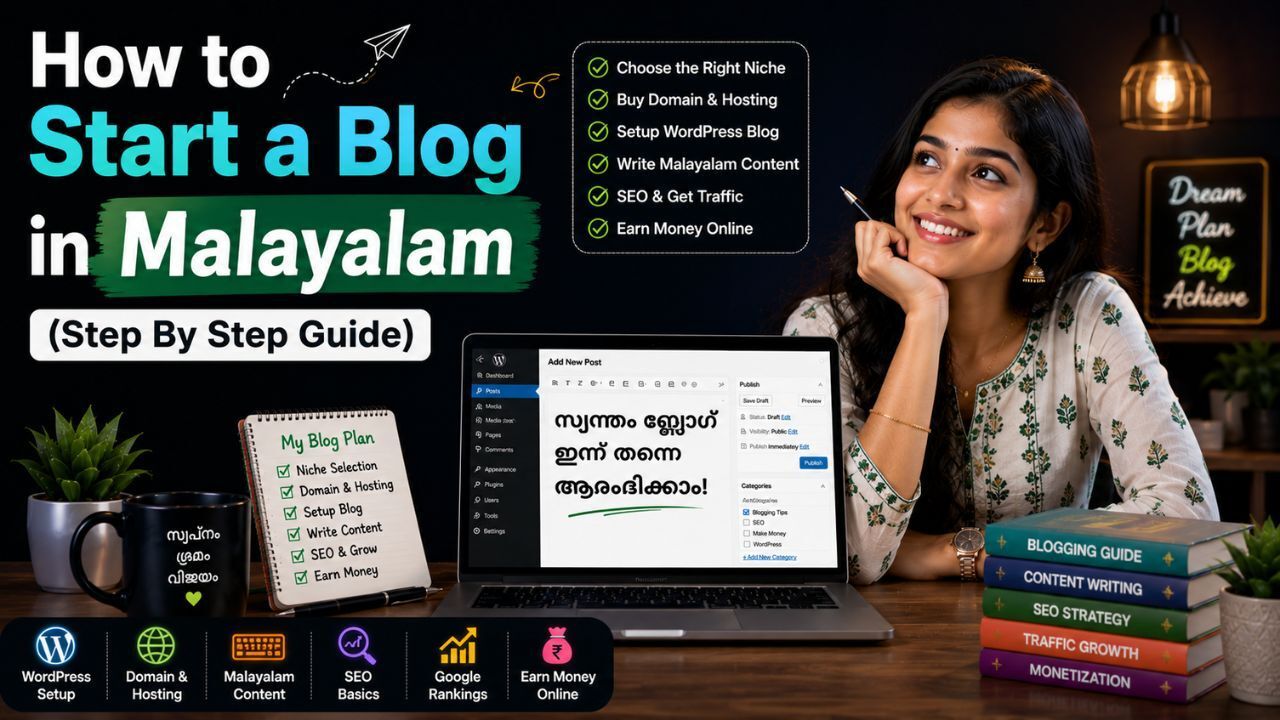
You open Google and search for information in Malayalam because reading in your own language simply feels easier, right? The same thing is happening with thousands of other people every day. More readers are now choosing Malayalam content because it feels natural, clear, and easier to connect with.
You may also have a thought in your mind right now. Can a Malayalam blog really grow? Can it bring traffic, readers, or even income opportunities? The answer is yes. Many topics still have lower competition compared to English websites, which creates good opportunities for new bloggers who want to build something of their own.
The best part is that you do not have to deal with coding, complicated tools, or confusing technical steps. Everything becomes much easier when you move one step at a time. From choosing your niche and setting up your blog to publishing content and growing your audience, you will understand the complete process in a simple way.
Why You Should Start a Blog in Malayalam in 2026?
More people now prefer reading content in their own language because it feels easier to understand and more natural. Malayalam blogging creates good opportunities because audience demand is increasing and many topics still have less competition than English websites.
More People Now Search Content in Malayalam
People now regularly search in Malayalam for information related to technology, education, careers, health, finance, travel, and entertainment instead of depending only on English websites.
Less Competition Than Many English Niches
English blogging already has millions of websites competing for similar keywords. Malayalam blogging still has many topics where useful content remains limited, creating more opportunities for newer websites.
Better Audience Trust and Engagement
Readers usually spend more time on content written in their own language because it feels more familiar and easier to understand.
This can improve:
- Session duration
- Page views
- Return visitors
- Click through rate
- Audience trust
Multiple Income Opportunities
A Malayalam blog is not limited to one earning method because income opportunities can increase as your website traffic and audience grow.
Common earning opportunities:
- Google AdSense
- Affiliate marketing
- Sponsored content
- Freelance services
- Digital products
- Online courses
- Consultation services
What You Need to Start a Blog in Malayalam
Many people think blogging starts with expensive tools, coding knowledge, or a complicated setup. That usually creates unnecessary confusion. A few important basics are enough in the beginning, and after that, your focus can move toward creating and growing your content.
- A Clear Blogging Goal
Before setting up your blog, spend a little time understanding why you want to start it. A clear direction can make content planning and future decisions much easier.
Your goal could be:
- Building an online business
- Sharing knowledge
- Creating passive income
- Building a personal brand
- Growing a community
For example, a blog created for income may focus more on monetization opportunities, while an educational blog may focus more on useful and informative content.
- A Specific Niche and Audience
Writing about everything can make a blog feel scattered. A focused niche usually makes it easier for readers and search engines to understand what your website is about.
Popular Malayalam blog niches include:
- Technology
- Education
- Food and recipes
- Travel
- Health
- Finance
- Jobs and careers
- Lifestyle
- Entertainment
- Local news
Choose a niche that matches your interest and can continue creating content opportunities over time.
- Malayalam Typing Tools
Creating content in Malayalam does not require expensive software or special technical tools. Several simple options are already available and can make writing more comfortable.
You can use:
- Google Input Tools
- Built in smartphone keyboards
- Voice typing
- Malayalam keyboard applications
The easier the typing process feels, the more comfortable regular content creation usually becomes.
- Basic SEO Understanding
You do not need advanced SEO knowledge during the beginning stages. Learning a few fundamentals can create a strong foundation for future growth.
Focus on understanding:
- Keywords
- Headings
- Internal links
- Meta titles
- Image optimization
SEO can become easier with practice, and additional techniques can always be learned as your blog continues growing.
How to Start a Blog in Malayalam (Step By Step Guide)
Starting a Malayalam blog becomes much easier when you break the process into simple steps. Below, you will learn how to choose the right niche, find content ideas, register a domain name, set up hosting and WordPress, publish your first article, improve SEO, and grow your blog over time.
Step 1: Choose Your Malayalam Blog Niche
Before buying a domain or setting up hosting, spend a few minutes thinking about one simple question: What topic can you continue writing about even after your first 20 or 30 articles? Many beginners start with excitement, choose random topics, and later run out of ideas.
Your niche does much more than decide what you write. It can influence the audience your blog attracts, future content ideas, and monetization opportunities as your website grows.
Choose a niche that matches:
- Your interest: Writing becomes easier when you enjoy the topic.
- Your knowledge: Existing knowledge can help create more useful and practical content.
- Audience demand: People should already be searching for information in that category.
- Long term potential: A topic with regular content opportunities can support growth over time.
Popular Malayalam blog niches include:
- Technology
Topics may include:
- Smartphones
- Apps and software
- Hosting and blogging
- AI tools
- Gadget reviews
- Website tips
- Food and Recipes
Topics may include:
- Kerala recipes
- Cooking guides
- Healthy food ideas
- Traditional dishes
- Kitchen tips
- Travel
Topics may include:
- Tourist places in Kerala
- Travel tips
- Budget travel ideas
- Travel experiences
- Local destination guides
- Education
Topics may include:
- Exams and preparation tips
- Career guidance
- Online learning resources
- Study techniques
- Student information
One thing many beginners do is select a topic only because it looks popular. Trends can change quickly, but a topic you genuinely enjoy can continue giving you content ideas for months or even years. Writing regularly becomes much easier when you are interested in what you are creating.
Step 2: Choose a Domain Name for Your Malayalam Blog
Before your blog goes live, one thing starts becoming your identity on the internet: your domain name. People will type it, remember it, share it with others, and slowly connect it with your content. A good domain can stay with your blog for years, which is why spending a few extra minutes here can save unnecessary changes later.
Since this guide uses Indian WordPress Hosting Plan, keeping your domain and hosting under one place can also make management easier. Instead of handling multiple dashboards, renewals, and settings across different platforms, you can manage everything from a single account.
A good domain name should include:
- Short: Smaller names are easier to type and remember.
- Easy to remember: Readers should recall your website without effort.
- Easy to type: Avoid names that create spelling confusion.
- Brandable: A unique name can help create your website identity later.
- Easy to pronounce: People should feel comfortable saying and sharing it.
Examples:
- MalayalamTechGuide.com
- KeralaFoodStories.com
- SmartMalayalamHub.com
- MalayalamCareerTips.com
- KeralaTravelGuide.com
- LearnMalayalamTips.com
Domain availability changes regularly, so always search before registration because an available name today may become unavailable later.
How To Register Your Domain From YouStable
After deciding your website name, open the YouStable domain registration section and search for your preferred domain.
The process only takes a few steps:
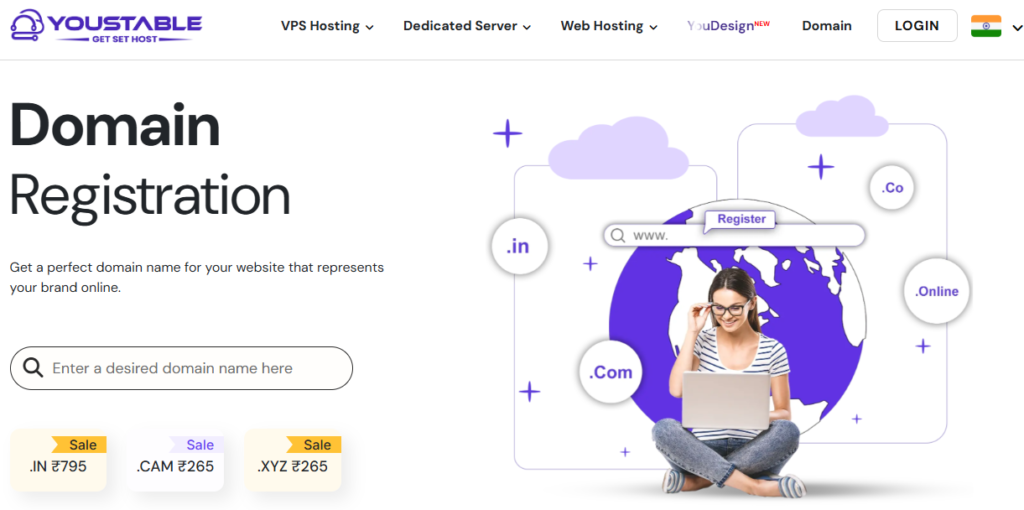
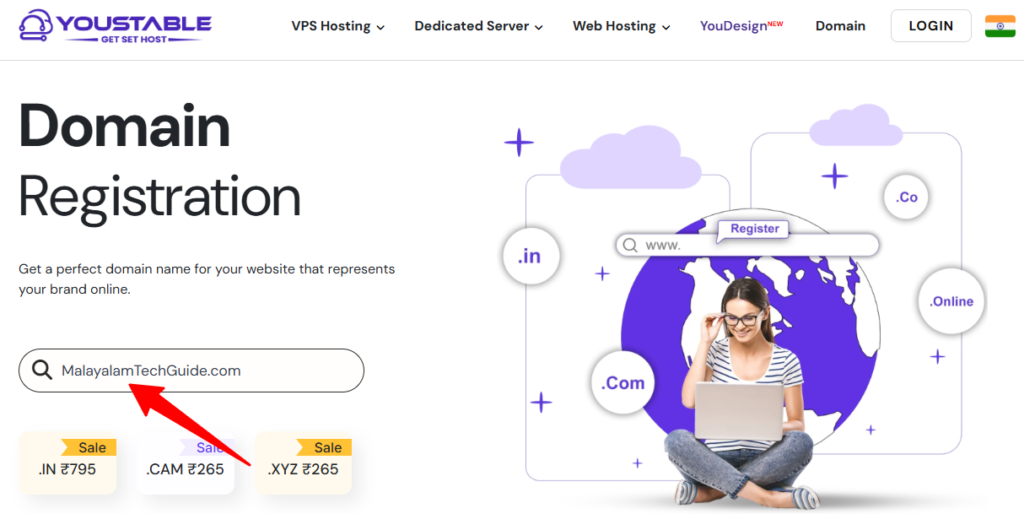
Step 1: Enter your preferred domain name in the search box.
Step 2: Check available extensions such as .com, .in, .online, or other available options.
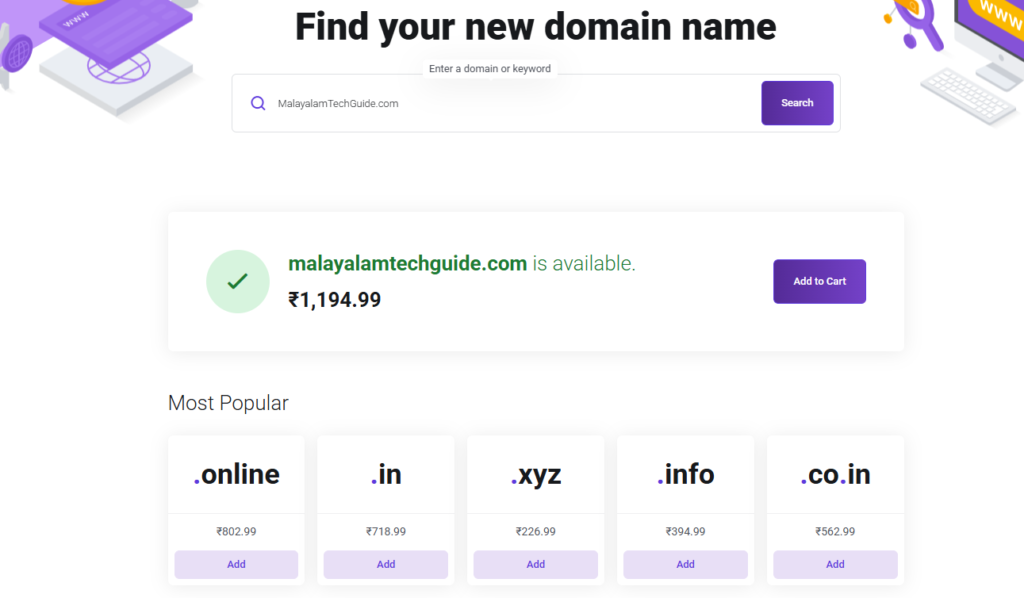
Step 3: Select the domain that matches your website and add it to your cart.
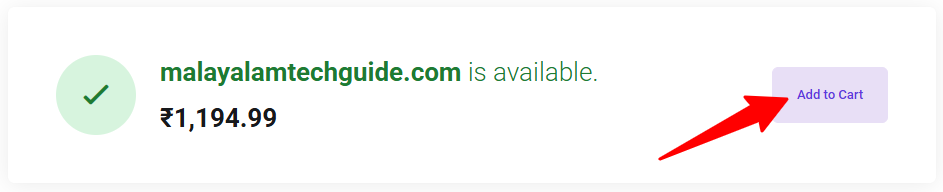
Step 4: Continue with registration and complete the order process.

The current domain page also shows additional services with domain registration, including:
- Free Privacy Protection: Helps protect personal registration information.
- DNS Management: Allows easier management of domain records and website connections.
- Domain Forwarding: Redirect visitors to another URL when needed.
- Domain Theft Protection: Adds protection against unauthorized transfers.
- Easy to Use Control Panel: Manage domains and settings from one dashboard.
Avoid these common mistakes while choosing a domain:
- Adding numbers: Numbers can create confusion while typing website addresses.
- Using long names: Longer domains often become difficult to remember.
- Using difficult spelling: Complicated words can send visitors to the wrong website.
- Using too many symbols: Extra characters can make the name look less clean.
One thing creates confusion for many beginners. People often try adding many keywords inside domain names because they think rankings improve automatically. Search engines care much more about useful content and user experience.
A clean and simple name usually creates a better impression than a long domain filled with extra words.
Step 3: Set Up WordPress Hosting With YouStable
After choosing your domain name, the next step is setting up hosting for your blog. Hosting stores your articles, images, pages, and website data so visitors can access your website online.
For a Malayalam blog, WordPress Hosting can be a practical option because it is designed specifically for content websites and bloggers. Based on the available YouStable WordPress Hosting plans and features, you can choose a plan according to your website requirements.
Current visible benefits include:
- Up to 80% OFF: Available on selected plans
- Free domain for one year: Available on eligible annual and long term plans
- Free Website Migration: Included with selected plans
- 30 Day Money Back Guarantee: Additional purchase flexibility
- LiteSpeed + LS Cache: Built for improved loading speed
- Imunify360 Protection: Additional website security
- Auto Updates Support: Keeps themes and plugins updated
- Free Off Site Backup: Extra website protection
Choose Your WordPress Hosting Plan
| Plan | Best For | Storage | Website Limit | Included Features |
| DaStart – ₹59/month | New blogs and beginners | 50 GB NVMe SSD | Single Website | Free SSL & Email, OneClick Backup Restore, AI Optimized Caching, AccelerateWP + LS Cache, Imunify360 Protection |
| DaProfessional – ₹119/month | Growing blogs and multiple websites | 100 GB NVMe SSD | Up to 25 Websites | Free Domain*, YouCache AI Plugin, OneClick Backup Restore, AccelerateWP + LS Cache, Free Website Migration |
| DaElite – ₹219/month | Larger projects and higher traffic websites | 200 GB NVMe SSD | Unlimited Websites | Free Domain*, YouCache AI Plugin, OneClick Backup Restore, AccelerateWP + LS Cache, Free Website Migration |
If you are starting your first Malayalam blog, DaStart can work well because a new website usually does not require larger resources in the beginning. Upgrades can always be done later if your website traffic grows.
Continue With Your Hosting Setup
Select Your Plan
Click Get Started below your preferred hosting plan.
Add Your Domain
You will see different options:
- Register a new domain: Create a new website name
- Use an existing domain: Connect a domain already purchased
- Transfer your domain: Move your domain from another provider
If your selected plan includes it, the free domain for one year option will automatically appear.
Choose Hosting Duration
Select your preferred duration:
1 Month
1 Year
3 Years
Longer plans may include additional savings and offers.
Create Your Account
Enter:
- Name
- Email Address
- Phone Number
- Password
Complete Payment
Choose your payment method and complete the order process.
Install WordPress
Open One Click WordPress Installer from your dashboard and enter:
- Website Name
- Username
- Password
- Email Address
Click Install WordPress.
After installation, access your dashboard:
yourdomain.com/wp-admin
Your WordPress setup is now complete, and the next step becomes customizing your website and publishing your first article.
Step 4: Install WordPress
Your hosting setup is complete, so now it is time to install WordPress. This is the software that helps you create articles, upload images, customize your design, and manage your entire blog from one dashboard.
Most WordPress hosting plans, including YouStable WordPress Hosting, include a One Click WordPress Installer, so you do not have to upload files manually or complete complicated technical steps.
Open WordPress Installer
Log in to your YouStable Hosting Dashboard and locate the One Click WordPress Installer option.
After opening it, you will see a setup form asking for a few details.
Enter Website Information
Fill in the required details carefully because these settings will become part of your website configuration.
Website Name: Your blog or website name that visitors will see.
Examples:
- Kerala Technology Hub
- Malayalam Travel Guide
- Smart Malayalam Tips
Username: Create an admin username for WordPress login.
Example:
- Adminkerala
- malayalamblogadmin
Avoid very common usernames such as:
admin
administrator
Using unique usernames can improve website security.
Password: Create a strong password.
A stronger password usually contains:
- Uppercase letters
- Lowercase letters
- Numbers
- Special characters
Example format: Malayalam@2026Blog
Email Address: Enter an active email address because WordPress sends important notifications here.
These notifications may include:
- Password reset requests
- Plugin updates
- Website notifications
- Security alerts
Complete WordPress Installation
After entering all details, click Install WordPress.
The setup process usually takes a few moments. During installation, WordPress automatically creates:
- Website database
- Dashboard files
- Default settings
- Login information
After setup finishes, your WordPress website becomes ready.
Open Your WordPress Dashboard
You can access your dashboard through: yourdomain.com/wp-admin
Example: keralatechhub.com/wp-admin
Enter your:
- Username
- Password
After login, you will enter the WordPress Admin Dashboard where you can manage your entire website.
Configure Basic WordPress Settings
Before writing your first article, change a few basic settings so your blog starts with a cleaner structure.
Site Title
Open:
Settings → General
Enter a website title related to your niche.
Examples:
- Kerala Technology Hub
- Malayalam Career Guide
- Kerala Food Stories
A clear title helps visitors understand your website topic quickly.
Time Zone
Inside Settings → General, locate the Time Zone option.
Select your local time zone correctly.
For example:
Kolkata (UTC +5:30)
This helps show the correct:
- Post publishing time
- Scheduled article time
- Website notifications
Permalink Structure
Open:
Settings → Permalinks
Select:
Post Name
Example: yourdomain.com/best-smartphones
Instead of: yourdomain.com/p=123
Cleaner URLs become easier to read and share, and they create a better website structure.
Remove Default Content
After WordPress installation, some default content is usually added automatically.
Delete:
- Sample post
- Sample page
- Default comments
This keeps your website cleaner before publishing your own content.
Install Basic Plugins
A few plugins can help improve website management.
| Plugin Type | Recommended Plugin | Purpose |
| SEO | Rank Math | Helps optimize content |
| Cache | LiteSpeed Cache | Improves website speed |
| Security | Wordfence | Adds website protection |
| Backup | UpdraftPlus | Creates backups |
| Contact Form | WPForms | Creates contact forms |
After completing these settings, your WordPress blog dashboard is ready, and the next step becomes writing and publishing your first article.
Step 5: Choose a Lightweight WordPress Theme
Now your WordPress installation is ready, so the next step is selecting a theme for your blog. A theme controls how your website looks, including layout, colors, menus, homepage design, and article pages.
Many beginners choose themes only because they look attractive, but adding a heavy theme with too many effects and unnecessary features can slow down a website. For a blogging website, speed and simplicity usually create a better experience.
What To Check Before Selecting a Theme
Choose a theme that includes these things:
- Mobile Responsive Design: Your website should adjust properly on mobile phones, tablets, and desktops because many visitors browse from mobile devices.
- Fast Loading Performance: A lighter theme can help pages open faster and create a smoother experience.
- SEO Friendly Structure: A clean code structure helps search engines understand website content more effectively.
- Regular Updates: Updated themes receive improvements, bug fixes, and security updates.
- Easy Customization: Colors, fonts, layouts, logos, and other settings should be simple to manage.
Beginner Friendly WordPress Themes
The following themes are commonly used by bloggers because they are lightweight and easier to customize.
| Theme | Best For | Main Features |
| Astra | Blogs, business websites, beginners | Lightweight design, faster performance, beginner friendly customization |
| GeneratePress | Content websites and blogs | Clean structure, speed focused design, flexible customization |
| Kadence | Bloggers and growing websites | Drag and drop options, responsive layouts, customization tools |
| Blocksy | Modern websites and blogs | Fast loading, modern design options, flexible layouts |
How To Install a WordPress Theme
Open your WordPress dashboard and follow these steps:
Appearance → Themes → Add New
Now search for your preferred theme.
For example:
- Astra
- GeneratePress
- Kadence
- Blocksy
Click Install, then select Activate.
After activation, open Appearance → Customize to change:
- Website logo
- Colors
- Fonts
- Header style
- Menu layout
For a new Malayalam blog, themes such as Astra or GeneratePress can work well because they provide a cleaner design, faster performance, and easier setup without adding unnecessary complexity.
Step 6: Create Essential Pages
Some pages help users understand your website and are commonly expected on professional blogs.
About Us Page
Explain:
- Who you are
- What your website covers
- Why readers should trust your content
Contact Page
Allow visitors to reach you.
Privacy Policy Page
Explain how information is collected and used.
Disclaimer Page
Explain limitations and disclosures.
Terms and Conditions Page
Set rules for website usage.
Step 7: Install Essential Plugins
Your WordPress blog is now ready, but a fresh WordPress installation does not include every feature by default. Plugins help add extra functionality such as SEO improvements, website security, backups, speed optimization, and contact forms.
Many beginners install too many plugins at the beginning, which can slow down a website and create unnecessary issues. Start with important plugins first and add others only when required.
Recommended Plugins for a New Malayalam Blog
| Plugin Category | Recommended Options | Purpose |
| SEO Plugin | Rank Math, Yoast SEO | Helps optimize articles, meta titles, and search visibility |
| Cache Plugin | LiteSpeed Cache | Improves website speed and page loading performance |
| Security Plugin | Wordfence, Solid Security | Adds protection against common threats and suspicious activity |
| Backup Plugin | UpdraftPlus | Creates website backups for recovery purposes |
| Image Optimization Plugin | ShortPixel, Imagify | Reduces image size and improves loading speed |
| Contact Form Plugin | WPForms, Contact Form 7 | Creates contact forms for visitors |
How To Install Plugins
Open your WordPress dashboard and follow these steps:
Plugins → Add New
Search for the plugin name.
For example:
- Rank Math
- LiteSpeed Cache
- Wordfence
- UpdraftPlus
Click Install Now and then select Activate.
Plugins You Can Start With First
If this is your first Malayalam blog, these plugins can be enough in the beginning:
- Rank Math: Helps with SEO settings and content optimization.
- LiteSpeed Cache: Helps improve website speed.
- Wordfence: Adds website security.
- UpdraftPlus: Creates website backups.
- WPForms: Creates contact forms for visitors.
Start with only the important plugins first because installing many plugins together can make website management harder and affect performance.
Step 8: Set Up Malayalam Typing
Your blog setup is almost ready. Now you need a simple way to write content in Malayalam. You do not need special software or advanced tools because several easy options are already available.
Choose the method that feels comfortable because regular content writing matters more than using complicated tools.
| Typing Method | How It Works | Best For |
| Google Input Tools | Type English words and convert them into Malayalam | Beginners and faster typing |
| Voice Typing | Speak words and convert speech into text | Quick content creation |
| Smartphone Keyboard | Use the built-in Malayalam keyboard available on phones | Mobile users |
| Malayalam Keyboard Apps | Install dedicated Malayalam typing applications | Regular Malayalam writers |
Enable Malayalam Typing
- Google Input Tools: Open the tool and type Malayalam words using English letters.
- Example: namaskaram → നമസ്കാരം
- Smartphone Keyboard: Open your phone keyboard settings and add Malayalam as a language.
- Voice Typing: Open Google Keyboard or voice typing tools and speak naturally.
Choose one method and start writing because you can always switch later if another option feels more comfortable.
Step 9: Publish Your First Malayalam Blog Post
Your blog setup is now ready, so the next step is publishing your first article. Do not spend too much time trying to make everything perfect. Focus on creating useful content that answers reader questions clearly.
Before Publishing Your First Article
Make sure your post includes these things:
Clear Title: Choose a title that tells readers exactly what the article covers.
Example:
Best Smartphones Under ₹20,000 in Malayalam
Use Proper Headings: Organize your content using headings.
H1: Main title
H2: Main sections
H3: Sub-sections
- Add Helpful Information: Write useful content that solves reader questions.
- Include Images: Add relevant images or screenshots where needed.
- Add Internal Links: Connect related articles on your website.
- Optimize for Mobile Users: Check whether the article looks good on mobile devices.
Publish Your Article
Open your WordPress dashboard:
Posts → Add New
Enter your:
- Title
- Content
- Images
- Categories
- Featured Image
After reviewing everything, click Publish.
Your first article does not have to be perfect because improvements can always be made later. The important part is getting your content live and starting your blogging journey.
Step 10: Submit Your Blog to Google Search Console
After publishing your first article, connect your website with Google Search Console. This helps Google discover your pages, monitor website performance, and track indexing status.
Set Up Google Search Console
Step 1: Open Google Search Console and sign in with your Google account.
Step 2: Click Add Property.
Step 3: Enter your website domain.
Example: yourdomain.com
Step 4: Verify domain ownership.
Common verification methods:
- DNS record verification
- HTML file upload
- HTML tag
- Google Analytics
Step 5: Submit your XML sitemap.
Open: yourdomain.com/sitemap.xml
Copy the sitemap URL and go to: Google Search Console → Sitemaps
Paste the sitemap URL and click Submit.
Step 6: Use URL Inspection Tool and request indexing for your important pages and first blog post.
After setup, you can monitor:
- Indexed pages
- Search impressions
- Clicks
- Keywords
- Website performance
- Coverage issues
Best Platform To Start a Malayalam Blog
Before moving ahead, spend a minute thinking about the platform you want to build your blog on. Many beginners start with free platforms because they look easier in the beginning, but later switch after facing limits in SEO, customization, and monetization.
The platform you choose now can affect how easily your blog grows later.
Popular Platforms for Malayalam Blogging
| Platform | Best For | Benefits | Limitations |
| WordPress | Long-term blogging websites | Full ownership, better SEO control, thousands of themes and plugins, stronger monetization flexibility | Requires hosting and domain |
| Blogger | Beginners and basic blogs | Free setup, easy to use, no hosting cost | Limited customization and fewer growth options |
| Medium | Simple content publishing | Easy publishing and built-in audience | Limited website control and branding options |
Which Platform Should You Choose?
If you only want to write articles casually, Blogger or Medium can work in the beginning.
But if your goal includes getting traffic from Google, building authority, using affiliate marketing, displaying ads, or creating a long term website, WordPress can give you much more flexibility.
With WordPress you get:
- Better SEO settings control
- More design freedom
- Thousands of plugins and themes
- Multiple monetization options
- Complete ownership of your website
Since this guide uses YouStable, using WordPress with YouStable Hosting can also keep your domain, hosting, and website management in one place instead of managing everything separately.
How to Write SEO Friendly Content for a Malayalam Blog
Publishing articles regularly is not enough if the content does not match what readers are searching for. A better approach is creating content that answers questions clearly, follows a proper structure, and provides useful information from beginning to end.
Step 1: Find Topics People Already Search For
Do not start writing random topics because writing an article first and searching for keywords later often creates problems.
Find topics using:
- Google Autocomplete
- People Also Ask
- Google Trends
- Related Searches
- Search Suggestions
Examples:
Instead of: Mobile
Choose:
- Best Mobile Under ₹15000 Malayalam
- Kerala Travel Places Malayalam
- Blogging Tips Malayalam
- AI Tools For Students Malayalam
Long-tail topics often work better because they target a specific search query instead of a broad topic.
Step 2: Select Your Main Keyword and Supporting Keywords
Choose one main keyword and a few supporting keywords before writing.
Example:
Primary Keyword: How To Start Blogging In Malayalam
Supporting Keywords:
- Malayalam blogging guide
- Blogging tips Malayalam
- Malayalam SEO guide
Blogging for beginners Malayalam
The main keyword becomes your article focus, while supporting keywords help cover related searches naturally.
Step 3: Create Your Article Structure Before Writing
Many beginners directly open WordPress and start typing. Creating a structure first makes writing easier and keeps content organized.
Use:
H1: Main article title
H2: Main sections
H3: Sub-sections
Example:
H1: Best Smartphones Under ₹20,000 In Malayalam
H2: Best Smartphone Options
H2: Camera Comparison
H2: Buying Guide
H3: Battery Performance
H3: Gaming Performance
A clean structure also improves readability.
Step 4: Write Content That Solves Reader Questions
Do not add unnecessary filler content. Focus on answering questions directly.
Include:
- Clear explanations
- Real examples
- Screenshots
- Step by step information
- Images
- FAQs
Weak example: Smartphones are useful devices.
Better example: This smartphone includes a 5000mAh battery, a 50MP camera, and performs well for gaming and daily use.
Specific information usually creates stronger content.
Step 5: Optimize Important On Page SEO Elements
Before publishing, optimize important SEO elements.
Title
Weak: Technology Tips
Better: 10 Technology Tips For Beginners In Malayalam
URL Slug
Good: yourdomain.com/blogging-tips-malayalam
Avoid: yourdomain.com/article123-blogging-guide-for-beginners-technology-tips
Meta Description
Example: Learn how to start a Malayalam blog with step-by-step instructions covering WordPress setup, SEO, content writing, and monetization.
Step 6: Use Internal Links
Internal links connect related articles and create a stronger website structure.
Example:
If your article is:
Best Smartphones
You can connect it with:
- Smartphone camera guide
- Mobile comparison article
- Smartphone buying guide
Benefits:
- Better crawling
- More page views
- Easier navigation
- Better user experience
Step 7: Optimize Images Before Uploading
Large images can reduce loading speed.
Before uploading images:
- Compress image size
- Resize larger images
- Add image alt text
- Use modern formats
Recommended formats:
| Format | Best For |
| WebP | Better compression and faster loading |
| JPG | Regular images and photos |
| PNG | Graphics and transparent images |
Example alt text:
Malayalam blogging dashboard setup
Step 8: Add Frequently Asked Questions (FAQs)
FAQ sections can answer additional user questions and improve content completeness.
Example:
How much does Malayalam blogging cost?
Can I start a Malayalam blog using mobile?
Which platform works best for Malayalam blogging?
Step 9: Review Your Article Before Publishing
Before clicking publish, check:
- Title added properly
- Headings structured correctly
- Images visible
- Meta title added
- Meta description added
- Internal links added
- Mobile view checked
- Spelling mistakes fixed
Step 10: Update Content Regularly
Publishing an article once should not be the final step. Important pages should be reviewed and updated regularly.
Update:
- Statistics
- Images
- Screenshots
- Links
- Information
- FAQs
Content updates help keep articles relevant and improve long term performance.
How To Rank Your Malayalam Blog on Google
Publishing articles alone does not automatically improve rankings. Search engines evaluate multiple factors such as content quality, website structure, user experience, relevance, authority, and trust before deciding where pages appear in search results.
If you want your Malayalam blog to grow consistently, follow a structured approach instead of publishing random content.
Step 1: Understand Search Intent Before Writing
Before creating an article, understand what users actually expect after searching. Matching user intent correctly can improve engagement and increase ranking opportunities.
Example:
Search:
Best hosting for beginners
The user expects:
- Hosting comparison
- Pricing information
- Features
- Recommendations
- Pros and cons
Not:
- Hosting history
- Technical definitions only
Intent types:
Informational Intent: Users want information
Example:
How to start blogging in Malayalam
Commercial Intent: Users compare products
Example:
Best hosting for Malayalam blogs
Transactional Intent: Users want to take action
Example: Buy WordPress Hosting
Step 2: Build Topic Clusters Instead of Random Articles
Publishing unrelated articles can create confusion. Building multiple connected articles around one main topic creates stronger topical authority and improves content relationships.
Example:
Main Article:
Blogging Guide
Supporting articles:
- Blogging mistakes
- SEO tips
- Hosting guide
- Keyword research
- WordPress setup guide
- Content writing tips
Step 3: Improve Internal Linking
Internal links help search engines understand website structure while also guiding visitors toward additional useful content on your website.
Example:
If your article is:
How To Start Blogging
Connect it with:
- Blogging mistakes guide
- SEO guide
- Hosting guide
- Keyword research guide
Benefits:
- Better crawling
- More page views
- Improved navigation
- Better content discovery
Step 4: Focus on Core Web Vitals
Website speed and user experience have become important ranking signals because visitors generally prefer websites that load faster and provide smoother browsing.
| Metric | Meaning | Why It Matters |
| LCP | Largest Contentful Paint | Measures loading speed |
| CLS | Cumulative Layout Shift | Measures layout stability |
| INP | Interaction to Next Paint | Measures responsiveness |
To improve performance:
- Use LiteSpeed Cache
- Compress images
- Use WebP images
- Avoid unnecessary plugins
- Use lightweight themes
Step 5: Build Trust Signals
Search engines evaluate website trust and credibility before ranking content. Strong trust signals can create a more reliable experience for both users and search engines.
Include:
- Author information
- About Us page
- Contact page
- Privacy Policy page
- References where necessary
- Helpful content
Step 6: Keep Content Fresh
Publishing an article once should not become the final step because information, screenshots, links, and statistics can change over time.
Update:
- Statistics
- Images
- Screenshots
- Links
- FAQs
- Information
Step 7: Earn Natural Backlinks
Backlinks from relevant websites can strengthen website authority and improve visibility. Focus on creating content people naturally want to reference and share.
Ways to earn backlinks:
- Helpful guides
- Original research
- Statistics
- Comparison articles
- Collaborations
Step 8: Monitor Website Performance
Monitoring website data regularly helps identify what performs well and what requires improvement for stronger rankings and user experience.
Track using Google Search Console:
- Search impressions
- Clicks
- Indexed pages
- Ranking keywords
- Coverage issues
- Top performing pages
Will Your Malayalam Blog Rank After Following These Steps?
Following these steps creates a stronger foundation for rankings, but Google rankings usually do not happen after publishing only a few articles. Content quality, competition level, website experience, search intent match, and consistency all work together over time.
Keep publishing useful content, improve older articles regularly, and continue optimizing your website because long term growth often comes from consistent improvements rather than one time work.
7 Ways To Make Money From a Malayalam Blog
A Malayalam blog can generate income through multiple methods. Most successful bloggers do not depend on only one source because relying on a single method can limit growth. As your content, audience, and website traffic increase, additional earning opportunities can also become available.
One thing to remember is that blogging income usually does not appear immediately. Growth often depends on content quality, audience trust, niche demand, and consistency.
1. Google AdSense
Google AdSense allows bloggers to display advertisements on their websites. When visitors view ads or interact with them, website owners can earn revenue.
For better approval chances:
- Publish original articles
- Create important pages such as About Us, Contact, and Privacy Policy
- Improve website speed
- Avoid copied content
- Maintain a clean website structure
AdSense usually works better after publishing multiple useful articles instead of applying immediately after creating a website.
2. Affiliate Marketing
Affiliate marketing means recommending products or services and earning a commission when someone purchases through your referral link.
Examples:
- Hosting services
- Software tools
- Smartphones
- Online tools
- Courses
- Gadgets
For example, if you write an article about best hosting for beginners and recommend a hosting service through an affiliate link, you can receive a commission when readers purchase through that link.
Many blogs generate a large portion of their revenue through affiliate marketing because it can work even with moderate traffic when content matches buying intent.
3. Sponsored Posts
As your blog traffic and authority increase, brands may approach you to publish content related to their products or services.
Examples:
- Product reviews
- Brand promotions
- Service recommendations
- Sponsored mentions
Sponsored opportunities generally become more common after a website starts building regular traffic and audience trust.
4. Offer Freelancing Services
Your blog can also work as your online portfolio where visitors see your skills and contact you for work.
Services may include:
- Content writing
- SEO services
- Website design
- Consultation
- Digital marketing
For example, if you regularly publish SEO related articles, businesses or website owners may contact you directly for SEO work.
5. Sell Digital Products
Digital products can create an additional income source because they do not require physical delivery.
Examples:
- E-books
- Templates
- Checklists
- Guides
- Worksheets
- PDF resources
For example, a technology blog could sell blogging templates, while an educational blog could sell study resources.
6. Create Online Courses
If you have experience in a topic, you can convert your knowledge into structured learning content.
Examples:
- Blogging
- SEO
- Photography
- Cooking
- Technology
- Language learning
For example, if your Malayalam blog focuses on blogging tips, you can later create a complete blogging course for beginners.
7. Combine YouTube With Blogging
Using YouTube together with your blog can create multiple traffic sources instead of depending only on search engines.
Benefits:
- More visibility
- Stronger personal branding
- Multiple income opportunities
- Audience growth
- Additional traffic sources
For example, you can publish a detailed blog article and also create a short video explaining the same topic. Readers and viewers can move between both platforms, creating a stronger content ecosystem.
A Malayalam blog does not always generate income through a single article or within a few weeks. Most blogs grow gradually as content increases, trust builds, and traffic improves over time. Using multiple monetization methods together often creates better long-term results than relying on only one income source.
FAQs
Can I start a Malayalam blog without buying hosting at the beginning?
Yes, you can start with free platforms like Blogger or Medium if you only want to learn the basics. However, many bloggers later move to self hosted WordPress because it provides better flexibility, customization, SEO control, and monetization opportunities. If your goal is long-term growth, starting with WordPress can save time later.
What things should I avoid when starting a Malayalam blog?
Many beginners make small mistakes that later slow down growth. Some common things to avoid include:
- Choosing too many topics at once
- Copying content from other websites
- Ignoring SEO basics
- Using very long domain names
- Publishing articles without a proper structure
- Expecting results immediately
Focusing on quality and consistency usually works better than trying to do everything quickly.
Can I manage a Malayalam blog only from a smartphone?
Yes. Many people create and manage blogs directly from mobile devices. You can write articles, upload images, reply to comments, and even publish posts through WordPress mobile applications. A computer can make some tasks easier, but it is not required to start.
How much time does a Malayalam blog usually take to grow?
There is no fixed timeline because growth depends on content quality, niche competition, SEO, and consistency. Some blogs start receiving traffic within a few months, while others may take longer. Blogging generally works better when you focus on regular improvement instead of expecting instant results.
Which Malayalam blog niches have good long term potential?
Several categories continue attracting readers because people regularly search for information in them. Popular options include:
- Technology and gadgets
- Education and career guidance
- Health and fitness
- Food and recipes
- Travel content
- Finance topics
- Blogging and online earning
Choose a topic that matches both your interest and long term content ideas.
Do I need perfect Malayalam writing skills to start blogging?
No. Your writing does not have to be perfect on the first day. Readers usually care more about useful and easy to understand information. Writing skills naturally improve with practice, and tools like Malayalam keyboards and typing tools can also make the process easier.
Conclusion
Starting a Malayalam blog may look like a big process at first, but after understanding each step, it becomes much easier than many people expect. You do not need advanced technical knowledge, expensive tools, or years of experience to begin. A clear niche, useful content, and consistency can create a strong foundation for long term growth.
One thing is important to remember. Your first article does not need to be perfect, and your blog does not need hundreds of visitors on day one. Every successful blog starts from a single published post. Keep learning, continue improving your content, and focus on helping readers through useful information.
Your Malayalam blog can become much more than a website over time. It can grow into a place where people trust your content, follow your ideas, and open opportunities for traffic, authority, and income. The important part now is simple: start your first step and let your journey move forward from there.